Engineering·Updated
Showing Taste in Judgment: An AI Workflow Case Study in Mailbox Analysis
I'm betting that detailed case studies are becoming the way to show skill. This one records the judgment behind an AI workflow that pulled five years of past customers out of a company's email.

Explore with AI
Introduction
There’s no shortage of opinions right now on how software should be built. Like most of us on X, I’m watching from the sidelines, testing out new workflows and exploring the ideas posted. There are already great discussions happening about this, but there is always room to explore further how we build the underlying skills and core judgment, and then communicate it, and get better at it in a way that outlasts any workflow.
In short, the solution I am betting on is a shift toward mainstream, detailed case studies, much like the one I share below, so that judgment can be displayed, evaluated, and improved in public. Consultants have been doing this for a while, and many senior software engineering roles already rely on it during hiring. But the days of showing just two or three screenshots and a simple link to previous work and a short description have come to an end.
Showing the outcome of a product in these times may not be enough. People used to immediately realize how much effort and thought you put into a project when you showed them a final walkthrough. Now, you are left open to being second-guessed on whether the project was actually well thought out. The person viewing your product is tasked with understanding the domain and putting in the effort to see if you have sound judgment, something they are unlikely to do, because it is so hard to test a person's judgment from an isolated result. Judgment needs to compound and form a predictable pattern so that others can truly believe you can implement the same pattern in their projects. Ultimately, this means we need to share parts of our thinking process that we are not usually familiar with, which can certainly feel a bit vulnerable, but it gives us an opportunity to communicate our judgment, open a window to the public, and allow for valuable feedback to sharpen and improve it.
Find the goal
The business and customer journey
Our case study is for an HVAC company based in the United Kingdom. They have been operating for five years installing and servicing heating and cooling equipment on businesses, real estate, and private property. They communicate with customers mainly through email and keep their data in spreadsheets. As the business grows, keeping track of customers has become harder over the years.
The owner has considered using a standard CRM featuring an email pipeline that syncs conversations and automatically populates customer names. However, the client bets on the fact that more can be done if we are able to analyze data within the email before it reaches a CRM.
To go deeper into what the client plans to understand from their mailbox, we have to understand how the business operates. The enterprise functions as one large continuous loop, stretching from generating work and receiving payments to reinvesting revenue into generating more work.
Within this operational cycle, every job follows a specific path from start to finish. The flow diagram below outlines the complete progression of how an incoming opportunity turns into a completed job.
The client’s bet
The client bets on re-engaging customers with expiring warranties to secure repeat servicing. Although individual service visits rarely turn a profit on their own, profitability becomes achievable when bundling multiple jobs in the same neighborhood or pairing them with a nearby installation, which cuts down on travel time and transportation expenses.
After getting all this background on the business and the client's bet, we need to set a goal that lets us constantly check if we are actually moving toward it. Establishing this goal brings structure and clarity, sitting right in the sweet spot of not being too broad or too narrow, which gives us the flexibility to switch bets if the current one doesn't pan out.
So below is the goal.
 Our goal
The business has five years of customers sitting unreachable in the Gmail mailboxes of several people. The goal is to get them out in a form the business can act on.
It clearly defines what we plan to do, not too narrow, but not too broad either.
Elements, connectors and bottlenecks
Our goal functions as a distinct unit within a system. My notes in Systems Thinking give me a way to break this down into three key concepts:
- elements (actors). The partakers in the system.
- connectors. The relationships between those elements.
- bottlenecks within the connectors. The friction points that affect how those relationships actually function.
- Key:
- Researchinternal research (5)
- Clientclient feedback loop (11)
- Bothresearch + client input (8)
Make it work
Kickoff
Our order of work is borrowed from Sam Bhagwat’s Principles of Building AI Agents: make it work, make it right, make it fast, a philosophy widely attributed to Kent Beck.
- make it work. Get an email thread through the workflow and produce a record I can inspect.
- make it right. Check the analyzed records against its sources and the client’s expectations. Find the mistakes and revise the system.
- make it fast. Run more email threads through it and find which constraints appear under load and find ways it can scale to process more email threads.
- make it useful. Run continuous Product Discovery through interviews, and make bets based on what the underlying system is capable of handling.
The last part (Make it useful) is my addition to Kent Beck's structure. Product discovery happens throughout the project, but giving it its own section makes room to look for opportunities where the extracted data can produce value. Similar parallels exist: some put 'Make it Useful' at the top, some at the end, and some treat it as continuous.
For this part, we divide the process into six stages and go through them one by one.
Prepare
Preparing the data covers getting the export and storing it in a form we can manipulate and analyze.
- Prepare (current step)
- Filter
- Group
- Extract details
- Analyze
- Show
So we ask, how do we get the client’s email without disrupting their day-to-day work?
We have several opportunities, each with their own pros and cons, which are mapped out in the opportunity tree below.
Read the options
- Gmail API via OAuth
- The owner signs into Google and grants our tool permission to read their emails, without sharing their password.
- Full export (.mbox) · chosen
- The owner exports their Gmail data and gives us the archive to analyze.It fits best since we only want read access, don't need to access live messages and will get access to all the data at once.
- Selected emails (.eml)
- The owner downloads selected messages as .eml files and shares them with us.
- Gmail delegation
- The owner adds us as a delegate so we can look through their mailbox in Gmail.
- IMAP via OAuth
- The owner authorizes a compatible app to fetch their emails over the standard email protocol.
Asking for an .mbox file gave all the access we wanted and the freedom to store and manipulate the data at hand. This is the first of multiple .mbox files to be acquired.
Read the options
- SQLite · storage
- A database in a single file. Indexes let us search by sender, date or subject without reading every message.We use SQLite for storage. A file that size would need better searching.
- JSON · exchange
- A useful format for exchanging structured records. Searching a large JSON export would still need a parser and a search strategy.We use JSON for exchanging structured data.
- JSONL
- One record per line, convenient for streaming. Repeated searches would still need scans or a separate index.
Which language should I use?
I wanted to use a language I am comfortable with. I found no reason to pay the cost of switching languages. Python would also fit the import and processing work, but I just enjoy reading TypeScript, though I can't claim I write it anymore.
Database design
Choosing SQLite to store our data naturally leads to the next question, how should we design our database model? Drawing from Michael J. Hernandez’s Database Design for Mere Mortals, the process starts with a clear mission statement and objective, which aligns with our core extraction goals.
- mission objectives. Focused on extracting specific business requirements, identifying equipment installations, service locations, quote and invoice histories, and warranty timelines, to allow repeat job bundling.
- legacy database and storage. Consists of email back-and-forth and spreadsheets. When inspecting these current systems, Hernandez cautions against copying spreadsheet layouts directly into table structures, since these layouts often combine multiple distinct subjects that should instead be separated into relational tables.
- business workflow. Mapped across five core stages, enquiries → site visits → quotes → invoices → completed jobs.
Database design is inherently iterative and refined continuously throughout the design phases, but our logical design phase is now complete after multiple feedback loops, ending up with the database diagram below.
Filter
- Prepare (done)
- Filter (current step)
- Group
- Extract details
- Analyze
- Show
In the filtering phase, we need to remove emails unrelated to our core goal. These filtering opportunities are apparent by simply reviewing the email archive.
Read the options
- Gmail-labeled
- Emails Gmail has already labeled Promotions, Purchases, Travel or Spam.
- Transactional
- Business emails that pass the labels but are obvious transactional emails, like no-reply logins.
- Everything else
- Emails that are not transactional and not caught by the Gmail labels, but are still not related to the customer. These are the harder ones to identify.
The bigger question is the age-old debate of deterministic versus AI filters. While the modern consensus favors a hybrid approach, we still have to ask: where should we draw the line, and what parts of the task can AI actually take over from traditional deterministic filters?
Instead of letting that assumption bias our approach again, let's keep it front and center while we first evaluate what a purely deterministic check can achieve and how far it can take us. Specifically, deterministic checks can easily filter out labeled Gmail messages and routine transactional business emails.
The mailbox after the deterministic checks
- Deterministic checksTransactional, promotions and marketing emails27.1% removed
- Left for extractionThe remaining emails that are ready for extraction72.9% kept
Rather than adding a separate AI filter to clean out the remaining noise, I chose to let the extraction agent absorb it, trusting that it would only surface records when actual job data was present. We are not optimizing to eliminate all noise entirely; the goal is simply to extract relevant details, not to achieve zero noise.
Fast-forwarding to the results, letting the email extraction agent handle the remaining data paid off. While the agent was busy extracting relevant details, it indirectly categorized 11% of the emails as unrelated noise.
The mailbox after extraction
- Deterministic checksTransactional, promotions and marketing emails27.1% removed
- Indirectly marked by the email agentEmails the deterministic checks missed, but the email agent indirectly caught11.1% flagged later
- Customer mailThe remaining emails that are ready for extraction61.8% kept
Group
- Prepare (done)
- Filter (done)
- Group (current step)
- Extract details
- Analyze
- Show
We can group the separate emails into threads using their unique X-GM-THRID headers found within the exported mbox data.
Extract details
- Prepare (done)
- Filter (done)
- Group (done)
- Extract details (current step)
- Analyze
- Show
To gather enough context regarding the data we need to extract, we ask ourselves and the client, what specific fields does the business need to know about a past customer or job, and exactly where within the messages are they located?
- Read from the body, subject or headers.
- Attachment
- Extracted from files in the sandbox.
- Derived
- Interpreted from evidence across emails and attachments.
Based on our findings, the required fields are buried across different parts of the thread, some reside in the email body, others are located within attachments, and a few must be inferred from the conversation.
To figure out how to approach this set of extractions, we first needed to determine what pattern to use, adapting to the reality that certain groups of extractions could be handled by deterministic logic while others required an agent. As Antonio Gulli’s Agentic Design Patterns highlights, we shouldn't treat these patterns as an either-or choice; instead, we approach them as modular blocks you build upon along the way. In our case, we ended up using all the patterns, starting from basic prompt chaining to parallelization, routing, and finally agent-directed execution.
Fundamentally, this aligns with Anthropic’s perspective on building effective agents, where a workflow is defined by paths set in code. We know the desired end result because the output and the broad sequence are known beforehand, while the model is left to handle the interpretation within each step.
Prompt chaining. Each model call works on the output of the one before it.Attachment-reader findings feed the final extraction prompt. Email-only conversations can use a single extraction prompt. The ordinary sequence of code steps doesn’t itself count as prompt chaining.
Parallelization. Independent pieces of work run at the same time.Multiple conversations are extracted concurrently, two by default and configurable up to 40. Customer and job reconciliation runs sequentially.
Routing. A step sorts each input and sends it down its own path.Email rules decide what reaches extraction, and attachment rules and a classifier decide which documents to read. There’s no separate AI router classifying every email before extraction.
Agent-directed execution. The model chooses its own next steps and tools.Within bounded tasks, the reader can request more text and submit findings, and the extraction agent can retrieve attachment pages. Code controls the overall workflow, available tools and limits.
At a high level, the proposed workflow is the following.
This orchestration can be done bare bones or with a framework, or even with a no-code tool.
Plain code. Direct model calls and ordinary functions. Few abstractions, but I would build the tracing, retries and experiment tooling myself.
n8n. A visual workflow with integrations and custom-code steps. Useful when much of the work is connecting services.
LangChain. An ecosystem in Python and JavaScript for composing model calls, tools and workflows.
Mastra. TypeScript agents, workflows, traces and evals in one development environment.It fit the language I knew and the short inspect-change-rerun loop I wanted.
I preferred using TypeScript since we already had the mailbox scripts built with it. LangChain (which also has a TypeScript package now) and no-code solutions could still work, but it gets a bit subjective at this point. I just really like Mastra for its trace viewers, evals UI, and their open-source philosophy. Plus, they put out great content for the community. Two of the key resources I used to understand agents more came from Sam Bhagwat's books, Principles of Building AI Agents and Patterns for Building AI Agents, and they also put out podcasts and workshops that are well worth checking out.
So, Mastra it is. Once we have a filtered golden set of grouped emails and threads, the first step Mastra handles is dealing with the attachments based on our proposed pattern in Figure 10.
Extracting data from attachments
Reading every attachment in every email thread would consume unnecessary time, compute power, and money. Our focus is strictly on extracting data from quotes and invoices, as all the attachment-sourced fields listed in Table 2 reside within them.
However, we still need a way to filter out quotes and invoices since there are many unrelated attachments, and their filenames don't follow any specific naming convention that we can filter out deterministically.
- Quote.pdf
- Brochure.pdf
- INV-2210.pdf
- IMG_2041.jpg
Introducing Jev
Right on cue, System 1 models were introduced (Jev calls them System 1 models rather than classifiers, apparently it's a big deal). But, given primitives for score, choice, and noul, I could use the choice primitive, passing in the filenames, file size and the entire email thread, to classify each attachment as a quote, invoice, or other.
I used Daytona for the sandbox, though several providers could have done the job. The server decodes the selected attachments from the email archive and uploads them through Daytona’s file API. Mastra Workspaces then gives the agent access to those files through the sandbox’s filesystem.
Reading the attachments inside the sandbox can be done in multiple ways. It is actually quite nuanced, as there are several tool options available, each tailored to different scenarios.
Read the options
- pypdf
- A Python library that extracts the text page by page.Best for: Quick text from simple, digital PDFs.Advantage: Pure Python, with no system tools to install, so it is the lightest to set up.
- pdfplumber
- Extracts text with its layout, and pulls tables out row by row.Best for: Quotes and invoices with tables and line items.Advantage: Keeps the layout and pulls tables out row by row.
- pdftotext
- A command line tool from poppler-utils.Best for: Reading many PDFs quickly.Advantage: Can retain layout or emit plain text without a model call.
- OCR
- pytesseract with pdf2image, reading each page as an image.Best for: Scanned PDFs and photos with no text in them.Advantage: Reads text the other three cannot see.
Luckily, Anthropic provides a PDF skill that I can hand off to the agent, letting it use its own judgment to pick the best package for any given PDF to read. This required pre-installing all the necessary libraries and CLI tools so the agent can call them.
Read the email body
With the attachments read, I can pass their extracted details to an AI agent alongside the email body to return structured information as shown in Table 2. Much of that information can be read directly, with service locations, quote IDs, and invoice IDs found in the attachments while the rest reside in the email itself.
The email content agent brings the email body and extracted attachment data together to recover customer details and identify the signals described in Analyze.
Analyze
- Prepare (done)
- Filter (done)
- Group (done)
- Extract details (done)
- Analyze (current step)
- Show
Our analysis has three steps. We find evidence through job signals and lead-source clues, interpret what it supports, then record the result in the structured fields shown in Table 2.
The job signals and lead-source clues we look for in the first step are listed below.
Job signals
- Inquiry. The first contact about a particular job, including a customer request, a platform lead or the business's opening message.
- Site visit. A survey or assessment visit is proposed, arranged or has happened.
- Quote sent. A quote was sent, or its delivery is explicitly planned or uncertain.
- Quote accepted. The customer accepted the quote. Under the current business rule, a formal numbered accounting quote also establishes acceptance.
- Invoice sent. The invoice was delivered to the customer. Having an invoice attachment alone does not establish this.
- Deposit paid. There is explicit confirmation that the initial deposit was paid.
- Remaining balance paid. There is explicit confirmation that the final balance was paid.
- Installation scheduled. An installation date or slot has been agreed with the customer.
- Installation completed. There is explicit confirmation that the work has been completed.
- Rejection. The customer declined the quote before committing to the work.
- Cancellation. Previously agreed or booked work was called off. A postponement or changed appointment alone does not count.
Lead source
- Bark. A Bark lead notification in the conversation.
- Google Ads. An explicitly identified Google Ads lead submission.
- Website. A message identifying the website enquiry form.
- Google Forms. A form notification that identifies the intake channel.
- Unknown. No supporting evidence. A form alone does not prove which advert brought the customer.
Now the question becomes, do we need a dedicated agent for analysis, or can the agent that extracts these details and signals also interpret them and return the analysis?
Separate analysis agent. A dedicated prompt and independently testable stage, with another handoff and model call.
Combined email content agent. Read and interpret in the same context. Fewer handoffs, but a broader output to evaluate.
The best way to choose between them is simply to try both and check which provides better results. It is best to decrease failure points. In the event that a single agent handles both correctly, it’s preferable to pick that approach.
I kept extraction and analysis in a single agent. Feedback loops and evals gave me enough confidence to go this path
That leaves a harder question: how do I tell whether the records are reliable enough to use?
Make it right
Evals
Setting up evals helps us test how reliable our agent is. Is the extracted information correct, and does it meet the client’s expectations?
There are 3 ways we can do evals:
Read the options
- Deterministic
- Code checks the output against an expected value.Use when: The expected answer is known and acceptable differences can be defined in code.Judges: Quote and invoice numbers, the customer name and the service address.
- LLM as a judge
- A second model scores the output against a rubric.Use when: The answer is free text, or a judgement that can be worded many ways.Judges: The job events inferred from the conversation, compared with a separate reading of the source.
- Human review
- A person checks the output and labels what is right.Use when: The answer depends on business knowledge, or the evidence conflicts.Judges: Business rules, uncertain customer/job matches, and the labels used by the deterministic scorers.
Deterministic scorers
Fields like customer name, service address, quote number, and invoice number are good candidates to score using deterministic evaluations provided with grounded data.
Acquiring a grounded dataset requires the painstaking process of manually reviewing a subset of our mailbox and extracting the scored fields. I looked through 20 threads, extracted the fields, and created a dataset in Mastra so we can run multiple evaluations on these emails.
Each scorer compares the agent’s output against the manually reviewed answer, scoring a match as 1 and a mismatch as 0. Flexible matching rules accommodate minor variations (like a dropped middle name or alternate address formatting) while still catching actual errors. Correctly identifying the absence of a quote or invoice on a thread also earns a full score.
The first headline score looked encouraging at 0.909 for the customer name. But only eleven of the twenty conversations had a score. Six had errored out and three finished without one. While the average represented ten correct names out of those eleven scored examples, it completely obscured the nine missing results.
The first reaction should not be to try a better prompt or a stronger model. Instead, it is to follow a framework that allows us to work in a loop, particularly the loop below.
Many failures came from the evidence gates the coding agent kept creating in code. I had required exact quotations to keep the model grounded, but the rigid checks were discarding correct answers as well.
- line-break mismatches: An address written on a single line failed to match the exact same address split across three lines in a PDF.
- citation bottlenecks: A single failed citation would reject an entire conversation.
- label restrictions: Service addresses required an explicit installation address label that most quotes did not contain.
- unreadable files: A correct quote number found in a filename was rejected simply because the PDF itself could not be read.
Switching between models provided this evidence.
I chose DeepSeek for the combination of observed performance and input cost. The short records it returned made output cost a smaller part of the decision.
After multiple iterations, the score averages fluctuated up and down. The table below shows how the results progressed from the lowest scores to the highest
LLM as judge
Our LLM-as-a-Judge evaluation is used to measure the accuracy and completeness of the email content agent. The judge, which is a different model from DeepSeek (currently GPT 5.6 Luna), checks whether the job signal events described in Table 2 (such as quote acceptance, payment, and installation booking) are supported by the original emails and PDF attachments, whether their details are correct, and whether any events were missed.
Our approach follows a QAG-style pattern, described in this article, where we break the evaluation into individual judgments:
- event identification: First, the judge identifies expected events from the source material without seeing the extractor's output.
- evidence comparison: It then compares each extracted event against that evidence, classifying it as supported, incorrect, unsupported, or not assessable.
- metric calculation: Application code uses these findings to calculate precision, recall, and overall performance metrics.
I applied the same failure-driven loop to the judge. Its first pass sometimes returned no events, making the extractor look wrong even when it had found something real. Later failures exposed disagreements in the rules.
Human in the loop
Including a human in the loop requires us to streamline the process of giving feedback between the domain expert and the person developing the system, with as little friction as possible. We focus this approach on our riskiest agent, the reconciliation agent. This is a new agent, separate from our email content agent, called at a different place, and used for a completely different problem.
A customer may appear under different names or email addresses, and a job may have a quote in one conversation and a booking in another. Matching those records is a completely different decision from extraction our email content agent does and much more riskier in a sense a wrong merge can incorrectly combine two people's histories.
Because of this, the reconciliation agent lacks access to update the database directly and only suggests possible matching jobs or customers for review. We initially scaled back its role because we lacked enough reviewed examples to establish its accuracy, but the workflow below gives us a way to build that evidence while keeping people firmly responsible for those final decisions.
The AI finds potentially related records and presents them in a dashboard alongside its reasons. A domain expert then decides whether the records describe the same customer or job, should remain separate, or need further investigation.
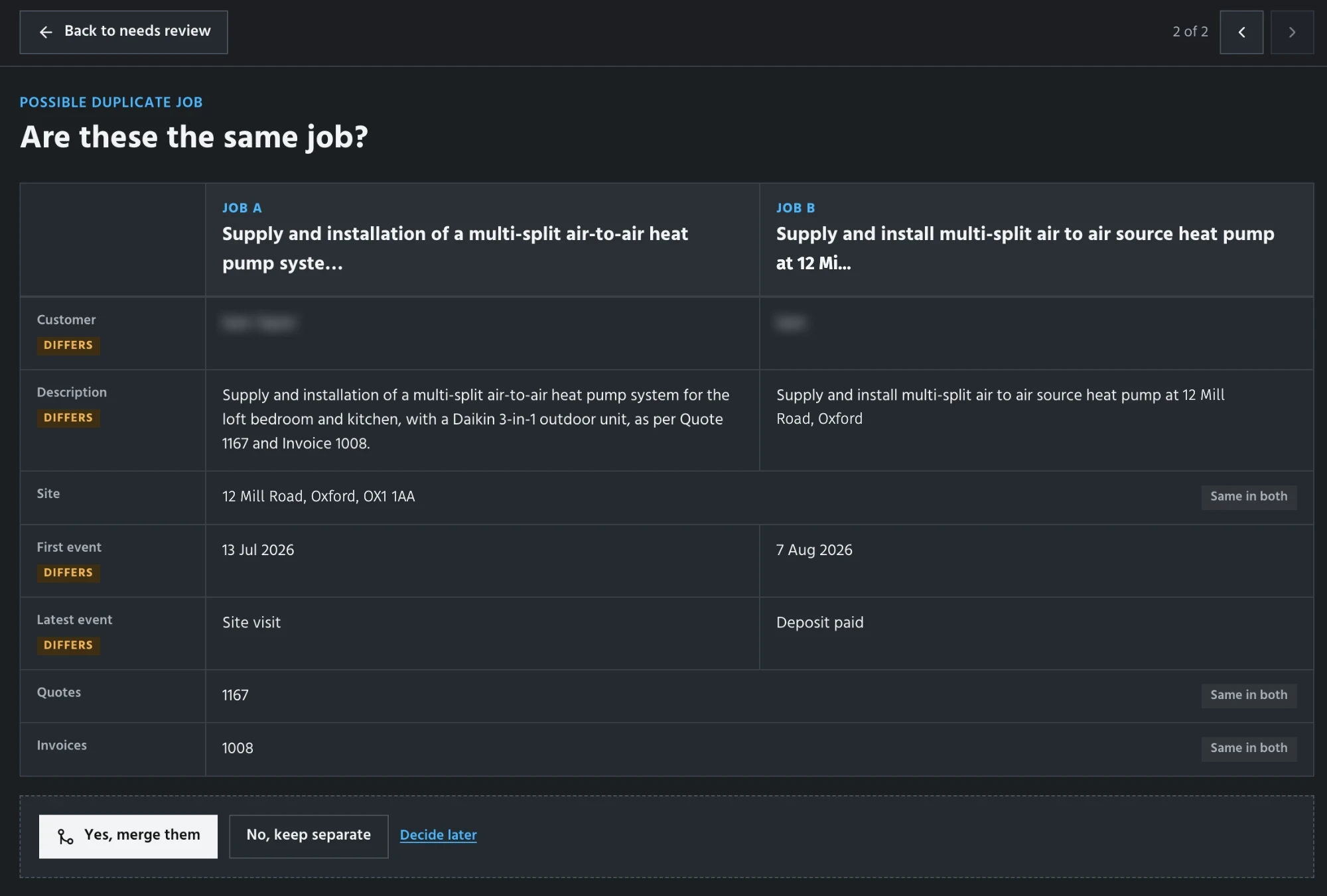
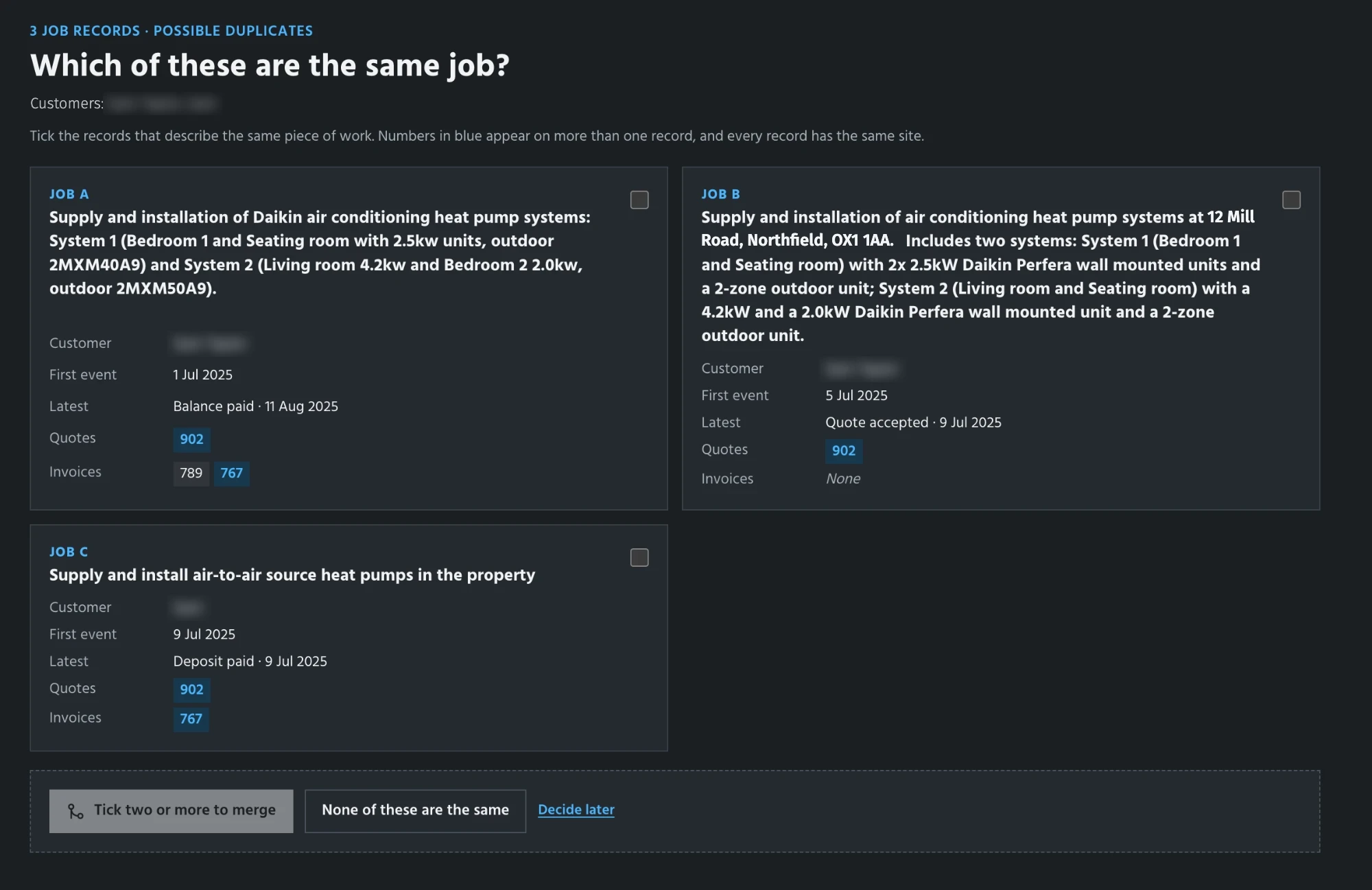
Each decision is saved with the exact records and evidence the reviewer saw. This creates a dataset for evaluating future reconciliation decisions, including cases where similar looking records should stay separate. We use data to refine the system and test it against held out cases. Once we have enough audit history and evaluations, we can use this human judgment to automatically notice and merge similar records automatically.
Make it fast
Find the bottleneck
We have reached the stage where we can scale this workflow to handle all relevant email threads we can get. That means being able to handle all email extraction, attachment extractions, and analysis.
To find opportunities in scaling, we need to push our current minimal workflow and see where it breaks. In doing so, we found three key opportunities:
- increase branching: Increase the number of branches that Mastra enables us to use to parallelize the process.
- optimize attachment processing: Minimize the time it takes to read and extract data from attachments in the sandbox.
- implement caching: Investigate caching opportunities so extractions and analyses can be rerun from cached results.
Scaling is orchestration
This part of the work reminds me of The Goal by Eliyahu M. Goldratt and Jeff Cox, where systems thinking plays a big role in implementing these types of tasks. It teaches us how we should treat workflow optimization the same way we treat optimizing factories. The book highlights scenarios where over-optimizing a single part of a system simply creates a bottleneck for the next step. Instead, we need to view optimization as orchestrating multiple moving parts and treat the entire system as a whole.
The same reasoning applies to our Mastra workflow. Increasing the number of parallel threads allows more tasks to request sandbox execution at once, but it doesn't automatically increase how many tasks the sandboxes can actually process. When those requests outpace available capacity, work starts backing up or competing for resources, meaning we might have more tasks running concurrently even while individual jobs take longer to finish.
Threads
- Working on its email
- Waiting for a sandbox
- Waiting over 4 s
- Its PDF is being read
PDFs waiting for a sandbox
- A PDF
- Waiting over 4 s
Sandboxes
- A read, filling as it goes
- Out of memory, at three or more reads
- The bottleneck, on any stage
- Finished a minute
- 1,414 threads20× scenario 1Only threads without a PDF finish. 999 PDFs a minute fail and are lost.Held back by the sandboxesThreads and sandboxes in balance
- Time per thread
- 1.7 sno time waitingWorkingWaiting
- Sandbox load
- 79%keeping up0100%200%
- Memory per read
- 384 MiBof 768Enough for a read
- Time per read
- 1.5×two reads share the vCPUA sandbox reads 1.3× as many PDFs
Because of this, we need to tune our thread concurrency to match the actual limits of our sandbox pool. This balance depends on the total number of sandboxes, the resources allocated to each one, and the heavy demands of each individual task. That doesn't strictly mean a one-to-one ratio of threads to sandboxes. Instead, it means opening up just enough parallel work to fully utilize our available capacity, while holding any excess work in a queue until resources free up. At the end of the day, our true measure of success is how much total work the entire workflow can push through reliably over time.
Reduce work per PDF
Once we dial in the knobs for concurrency and the number of sandboxes to an optimal level, we see another opportunity to cut down the time it takes to read attachments from the sandboxes, based on what we discovered in the traces
- Before fixes25 min 41 s
- After fixes11 min 54 s
About 54% less time
Caching
Caching pays off especially on repeated runs as we tweak the prompts. I might change the email prompt several times without changing the attachments, and re-reading every unchanged PDF makes that feedback loop unnecessarily slow. It also pays off by lowering compute costs for the sandboxes. Ultimately, there are various caching opportunities we can leverage throughout the entire process of extracting content from attachments
- Baseline25 min 41 s
- Optimized, warm cache2 min 59 s
About 88% less time
The complete workflow
If I had to map out this whole system in one go, it might look something like this, at least, as best as I can picture it.
You’ve got Jev feeding attachments into a cluster of Daytona sandboxes, and DeepSeek turning that raw evidence into clean records. Throw in our scorers, the signal judge, and human review, and you've got quality control keeping everything grounded. Thanks to the anatomy skill we can generate this factory floor view.
Make it useful
Find a useful next action
- Prepare (done)
- Filter (done)
- Group (done)
- Extract details (done)
- Analyze (done)
- Show (current step)
We've kept product discovery running through every phase of the project, using our weekly client calls to align ourselves with each other and place our bets. Once all those records are out of the mailbox, it brings us back to a core business question: out of everything we could do with that history, which path is actually worth pursuing first?
Teresa Torres’s approach to continuous discovery gave me a solid framework for handling this. It boils down to keeping the feedback loop open with the people actually using the product, digging into their real needs, and testing small decisions against a clear desired outcome and touching base with the owner as the work evolves.
Much like we've been using an Opportunity Solution Tree to guide our own decisions throughout this project, we can use it here to map out the client's bets.
Read the options
- Warranty-window servicing · chosen
- Invite customers whose installation is 8 to 18 months old to book a service visit.The owner chose to explore this opportunity first. It remains a bet to test with real records and service decisions.
- Timely upsell
- Offer a relevant addition or upgrade at the right point in the relationship.
- Maintenance subscription
- Offer a plan for periodic servicing of the installed system.
- Past-customer reviews
- Ask a suitable past customer to leave a review.
The owner chose to explore servicing past installations around the warranty window. We then discussed three ways to put that information in front of them.
Weekly list. Every week, a list of the customers becoming due.
Grouped by area. Due customers grouped by the area they live in.The owner said a single service visit far away isn't worth the trip. Grouped by area, a visit can sit next to other work nearby.
Planned work area. Enter where the team is working next and find due customers near it.
The service list and map
Deliver the dashboard
To balance remote visibility with data privacy, we serve a password-protected dashboard running on a bundled snapshot while keeping all raw input files safely local. We handle local data imports, retries, and staging environments to review changes before release, laying the groundwork for a smooth review and deployment pipeline. We have the detailed decisions below
Next steps
Writing a conclusion to a project built around feedback loops feels a bit strange, mostly because it never really feels finished. The owner’s bet on nearby service opportunities might turn out to be wrong, and if it does, we simply go back to the opportunity tree and test another branch. On top of that, adding a new mailbox from another employee to our dataset will soon force us to revisit the eval set.
What I want to carry into the next project is the habit of asking what the goal is at every single layer: keeping alternatives visible, treating every choice as a bet until the evidence backs it up, and always watching where the constraint moves next. I caught myself chasing preferences, over-optimizing a filter past its usefulness, and speeding up one stage right until the next one broke. Writing those decisions down gives someone else a chance to catch the blind spots I still haven't seen.