A lead-to-CRM engine that qualifies, deduplicates, and routes every inquiry.

Hi! I run an Ethiopian coffee business selling packaged roasted coffee beans and ground coffee. Online orders come through my Shopify store, while other customers use a form on my website or send me WhatsApp messages.

Right now I copy everyone into a spreadsheet by hand, and it's a mess. Same customer shows up two or three times, WhatsApp orders never make it in, and I can't tell my best buyers from one-time visitors.

I'm looking for someone to put all of this into one clean, deduplicated contact list automatically, ideally sorted by how valuable each customer is. Thanks!

Here’s how I’d clean it up without getting in your way.

First, I’ll make a safe copy of the customer information you already have and clean it separately. You and your team can keep taking orders as usual while I work.

Next, I’ll bring together the Shopify, website, and WhatsApp records, remove duplicates, and check that each customer’s details and order history are correct. Any new orders placed during the setup will be included before the new system goes live.

n8n is the best solution for this type of task. It already handles this kind of connection and routing well, and the workflow is visual, so you can follow what happens at each step. That also makes it easier for someone else to take over, maintain, or change later. The goal is a dependable system you can own, not clever code that only its original developer understands.

The final result is one reliable customer list: each person appears once, their information is up to date, and your best customers are easy to identify. I’ll also keep the original data as a backup.
01 · Intake
ShopifyOrder trigger → extract
Website formForm trigger → extract
WhatsAppFilter → AI parse → extract
02 · Normalize
Clean + score customerStandardize email and phone, calculate a 0–100 value score, assign Hot / Warm / Cold.
03 · Match
Find the customerSearch Airtable by normalized email or digits-only phone, then count possible matches.
04 · Route
ContactsCreate or update
Review queueMissing or duplicate ID
AlertsReview + error events
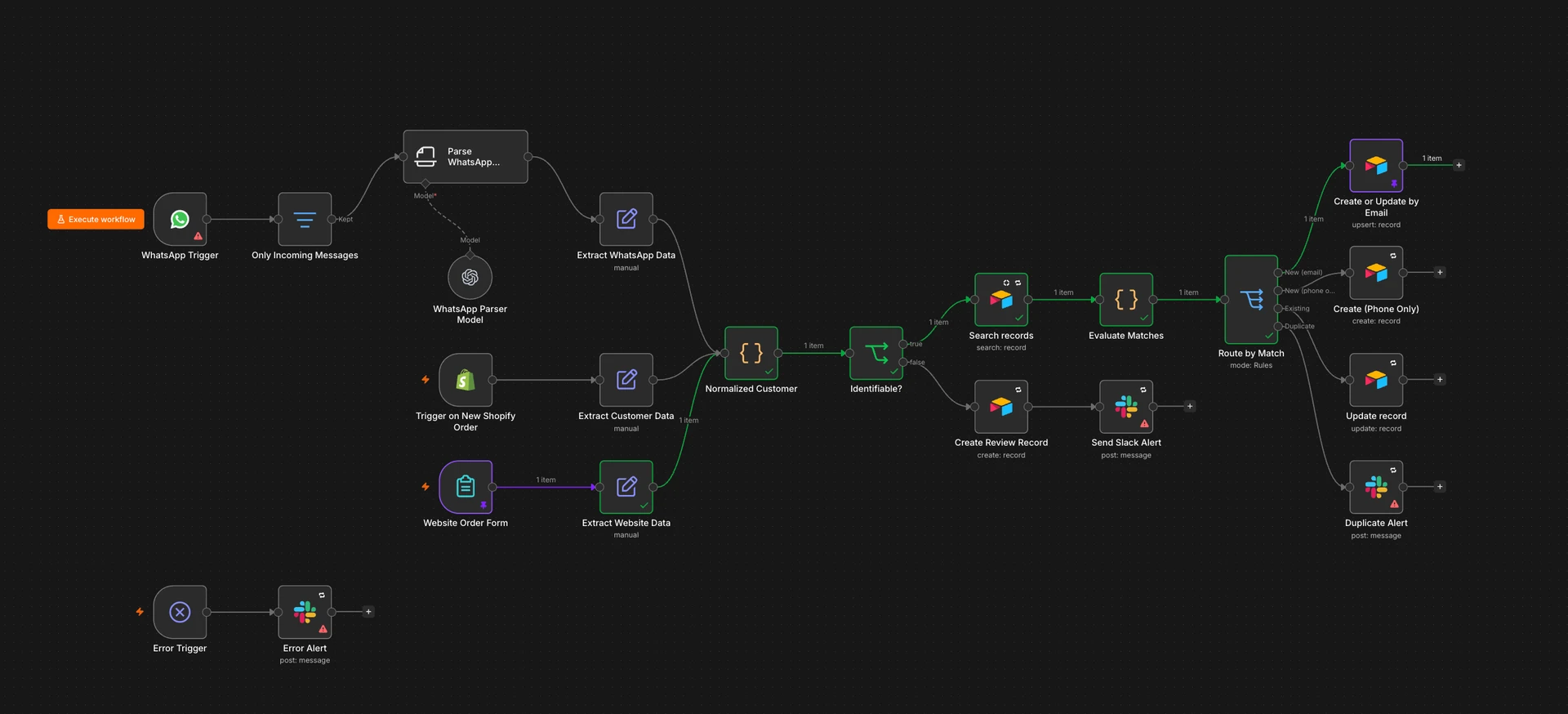
The complete n8n workflow connecting WhatsApp, Shopify, and website orders to customer cleanup, matching, Airtable records, review queues, and Slack alerts.
The actual n8n workflow. Shopify, the website form, and WhatsApp all feed into the same customer cleanup, matching, and CRM process.

What can go wrong and how I’d deal with it.

Even a well-built workflow will run into messy data and the occasional outage. Here’s how I’d plan for the situations most likely to cause trouble.

01

Shopify sends the same order twice

Say Shopify does not hear back quickly enough, so it sends the same order again. If the workflow treats it as new, you end up with two copies of the order and possibly two customer records.

I’d check Shopify’s order ID before saving anything. If that order is already there, the workflow updates it instead of creating another copy.

02

Two records look like the same customer

Someone orders through Shopify with one email, then messages on WhatsApp from a phone shared with their business. The records might belong together, but there is not enough evidence to be sure.

I would leave both records untouched and send them to a review queue. You can compare them side by side and merge them only when the match is clear.

03

A WhatsApp message leaves out the important bits

A regular customer writes, “Send me the usual,” without mentioning a product, quantity, email, or delivery address.

The workflow would keep the original message, point out what is missing, and put it in the review queue so someone can follow up instead of letting the system guess.

04

The CRM goes down for a few minutes

Airtable hits a rate limit or briefly stops responding just as a new order comes in.

I’d have the workflow wait and try again a few times. If it still cannot connect, it keeps the order safe, records what failed, and sends an alert so nothing disappears quietly.

05

The contact saves, but the next step fails

The contact reaches the CRM, but the customer score or Slack notification fails. Running the whole workflow again could create a duplicate.

I’d record where the workflow got to, then restart it from the failed step. The completed work stays in place and the contact is not added twice.

06

The score gets a good customer wrong

A loyal wholesale buyer orders less often but spends much more. A simple order-count rule could rank them below someone making frequent small purchases.

I’d test the scoring rules against customers you already know, keep the calculation easy to inspect, and let you adjust a score when the numbers miss the bigger picture.

Copy the workflow and make it yours.

Paste the JSON into a blank n8n workflow, then connect your own Shopify, WhatsApp, Airtable, OpenAI, and Slack accounts. The routing, deduplication, review, retry, and alert structure comes with it.

Adapt it to my stack

Explore next

Read the thinking behind the work.

Explore essays about software, AI, attention, and the systems shaping everyday life.

Browse the writing